In line with semantic and pride versioning, v2.0.0 of Gurp is ready to go.
Gurp v1 was an entirely personal project, with the aim of doing everything my existing Ansible setup did. V2 goes beyond that, adding features other people might want.
The
HISTORY
gives you the cold facts, but I want to give my hypothetical users a bit more
context around certain changes.
UX - DSL and Commands
This is a major version number bump, so what’s changed?
The thing that will most likely break existing code is that 2.0.0 formalises the
concept of “helpers”. Gurp 1.x had functions like (zone-fs) floating around in
the top-level DSL namespace, only tied to the doer that needed them by a naming
convention. Now, these things belong to the doer, as shown by their namespace.
So (zone-fs) and (smf-method) are now (zone/fs) and (smf/method).
Code which used the (hostname) function won’t work now either. The hostname
and zonename are better expressed as facts, which we’ll talk about later.
The old symlink doer is now link, because it also supports hard links.
Symbolic links are the default though, so just changing the name keeps the old
behaviour.
They’re the breaking changes in the DSL, but the command-line interface has
changed too. The show command is gone, replaced by doers and describe.
gurp doers lists all supported doers, and gurp describe <doer> gives you
doer documentation, including a table of properties and usage examples.
Due to changes in the way Gurp embeds its DSL library, 2.0.0 drops support for
the -L option, which let you override the embedded library with a local one.
This was useful in the early days of Gurp, when I was actively developing and
changing the DSL, but far less so now. If I don’t miss it, you won’t.
And what’s new?
Most fundamentally, doers now have
proper definitions.
As an example, here’s the pertinent part of the link doer:
(def doer :link)
(def description "Create and remove links.")
(def name-is "Qualified path to the link that will be created")
(def mandatory-props-ensure
  {:source
   {:types [:string]
    :help "The file to which we will link"}
   :force-link
   {:types [:boolean]
    :help "If the link target already exists and this flag is true, Gurp will
           remove it and replace it with a link. If false, a pre-existing target
           causes an error"}
   :type
   {:types [:string]
    :help "The type of link: symbolic or hard"}})
(def optional-props-ensure {})
(def mandatory-props-remove {})
(def optional-props-remove {})
(def defaults-ensure
  {:type "symbolic"
   :force-link false})
(def defaults-remove {})

...

(def notes
  ["If the source doesn't exist, you get an error."
   "Files and directories are ensured before links, so you can link Gurp-managed
    resources."])
This information gets used all over the place. First, when Gurp examines a
link/ensure or link/remove resource, it checks to see if the properties
supplied are allowed, and of the right type. It also checks that everything that
should be there, is there. If any of these checks fail, the user gets a helpful
error:
unexpected property :owner. Valid properties are :force-link, :source, :type, :label
did not find mandatory property :source. Mandatory properties are :force-link, :source, :type
The :help properties and the notes definition are used to generate the
output of gurp describe link, and also to generate
the online documentation,
so those things are always up-to-date and correct.
The examples you see in the documentation are part of Gurp’s codebase and they are also used in the DSL unit tests, the back-end unit tests, and Merp, Gurp’s functional test suite. This keeps everything super-tight and reliable, though can be a bit of a pain when one of the examples changes for a good reason.
A more user-facing new addition: roles can accept parameters. When you call a
role, add parameters as :key value, and they’ll end up in a role-params
struct scoped to that invocation of your role.
(role test-role
      (file/ensure "/tmp/test"
                   :content (get role-params :content "default content")
                   :owner (role-params :owner))) # will fall back to default

(test-role :owner "rob" :content "words and stuff")
# directory owned by rob with content "words and stuff"

(test-role)
# directory owned by root, with content "default content"
If you want parameters to be mandatory, put (requires :vital-property) at the
top of the role definition. You can add as many as you need.
Next, the REPL. I love a REPL, so Gurp had to have one. It starts up a proper Gurp environment, with full access to the DSL.
$ gurp repl
repl:1:> (fact :hostname)
"serv-build"
repl:2:> (fact :ip-interfaces)
{"build_net0" { :class "IP" :current "bm-------Z4-" :persistent "-4-" :state "ok"}}
repl:3:> (pathcat "a" "b" "c")
"/a/b/c"
Facts again. When are they going to get to the fireworks factory? We will, I promise.
The apply command has a new --exec option, which lets you apply (or see the
potential effect of) snippets of Gurp code:
$ gurp apply --noop --exec '(directory/ensure "/home/rob" :owner "root" :mode "0700")'
2026-05-09T11:29:21.014011Z  INFO doers::types: Configuring host: gurp-runner
2026-05-09T11:29:21.014516Z  INFO util::file: /home/rob: setting user: group to 0:0
2026-05-09T11:29:21.014550Z  INFO util::file: /home/rob: changing mode 0755 -> 0700
2026-05-09T11:29:21.014718Z  INFO commands::apply::init: Run time: 14.966ms
2026-05-09T11:29:21.014746Z  INFO commands::apply::init: resources: 1  changes: 1
While developing and testing Gurp, I found I often had to clean up
partially-created runs. To facilitate this I added the very dangerous
--destroy-everything-you-touch
option to apply. This turns all your ensure resources into removes. As I
say, very dangerous. It’s deliberately long, with no short option, so you won’t
do it by accident, but don’t get too hasty pulling things out of your shell
history!
I also found in testing that – just occasionally – I wanted to remove existing
resources before creating others. So, I added apply --remove-first. Normally
Gurp applies your ensures before your removes, and this flips the order.
Again, no short option,and you don’t need it until you need it.
In a couple of my Gurp configs, I used env vars to dictate behaviour. Now, I’ve
got this env-var prejudice. I know the kids use them for everything now, but I’m
an old-skool unix guy, and in that world, using and env var often meant a dirty
hack. So now, Gurp accepts compiler-like “defines”, with the -D flag. It works
on apply and repl, and you can define as many things as you like.
Defined values end up in a global struct called gurp-user-defs, which you can
access from anywhere in your config. Or, naturally, from the REPL.
$ gurp repl -D byerp=gurp -Dmerp="[1 2 3 4 5]" -D lurp
repl:1:> gurp-user-defs
{:byerp "gurp" :lurp true :merp "[1 2 3 4 5]"}
repl:3:> (gurp-user-defs :byerp)
"gurp"
repl:4:> (gurp-user-defs :wat?)
nil
repl:5:> (get gurp-user-defs :missing "default-value")
"default-value"
repl:6:> (get gurp-user-defs :lurp)
true
Notice that lurp has a value of true. That’s what happens with values that
are not key=value pairs.
How about that array? There’s no way Gurp could know for sure you wanted it to
be an array, so it gets turned into a string. But this is Lisp (kinda), and data
is code and code is data and all of that, so you can turn it (or a literal
representation of any other data type) into the real thing with eval-string.
repl:7:> (gurp-user-defs :merp)
"[1 2 3 4 5]"
repl:8:> (apply + (eval-string (gurp-user-defs :merp)))
15
If you want to eval-string arbitrary user code, on your head be it! You do at
least have the safety of the sandbox. (Keep reading.)
There are other small quality-of-life improvements to the
DSL. One is recreate,
which ties in with -D. If, when defining a Gurp managed zone myzone, you
give it the property :recreate (recreate? "myzone"), then on a normal apply,
if the zone exists, Gurp will do nothing. But if you run
gurp apply -Drecreate-zone-myzone, it will be destroyed and recreated. The
simple value is used so you can supply multiple zones, and expanding a literal
array automatically with eval-string is open to abuse. You can have Gurp
recreate all zones with a :recreate property by passing
-Drecreate-all-zones.
Networking
The first person who looked at Gurp 1.0.0 immediately asked “how do I configure networking?”. And the answer was “you can’t”, because my flat little home LAN didn’t need any. We were both disappointed.
Gurp gained the ability to manage VNICs, IP interfaces, IP addresses and IP properties in 1.x releases, but they had slightly messy and inconsistent interfaces, which have now been made uniform. 2.0 also adds
- Pretty complete support for bridges.
- vlan tagging of network interfaces.
- Full coverage of network flows. (I was surprised and disappointed to find the actual OS support for these is much less comprehensive and ergonomic than one might expect. I’ve done my best with it.)
- Firewalling. The
ipfilter doer
is pretty much an MVP, assembling a single
ipf.conffrom various prioritised sources and ensuring it is applied. Gurp doesn’t (currently?) let you configure non-global zone firewalls from the global zone. If you want that, ask for it. - Network address translation. Again, the NAT doer is quite minimal, but does enough to be useful.
Zones
Zone support has improved since I wrote about it in 2025.
Most of the improvements that the user can see are around images. For starters,
you can now create illumos branded zones, which require an image. You can
also, when building bhyve zones, use zst images, which is pretty much
essential if you want to run, say, OmniOS inside OmniOS. (This is how Gurp’s
(also greatly improved) test suite works.)
Every zone type used to have its image path defined in a different way, but now
they’re all unified under a top-level :image property.
You can also easily specify limitpriv, hostid, ip-type, pool , acpi
and boot-rom when you define a zone. Some of these are essential for fussy
bhyve clients.
Sandboxing, and Facts
Gurp has two core principles which conflict.
Firstly, there is no “command” doer. Gurp does not provide a way to shell out when it applies config. As I’ve said before, if it’s important enough to run on a production machine, it should be written in a proper language with proper tests.
Secondly, Gurp uses a real, imperative programming language to define content. Though the runtime phase cannot execute arbitrary commands, the compile phase can. This is open to abuse from well- and ill-intentioned users.
Fortunately, Janet has a sandbox feature, which is enabled in Gurp 2.0.0.
Gurp’s embedded Janet interpreter now does not allow command or thread execution, filesystem modification, or network access. (There are others too, but they’re the main ones.)
This decision, though, wasn’t entirely easy. By sandboxing, have I turned my lovely Janet DSL into a brackety YAML? We still, of course, have real looping, variables and conditionals, but compile-time execution was super-useful, to the point that the DSL depended on it.
So, I built in an escape-hatch. Though straight Janet subprocesses will error at
compile-time, the DSL provides (run-cmd) and (run-safe-cmd), implemented in
the Rust backend. They compare their arguments against RUN_CMD and
RUN_SAFE_CMD constants; hardcoded vecs of permissible commands. The latter
checks the whole command, args and all; the former checks the command, but
allows any arguments. It’s a bit like a sudoers.
We already saw the new (fact) function. It uses RUN_SAFE_CMD to make calls a
user is likely to need. Results are returned as appropriate Janet structures
which you can interrogate as needed. You also have read-only filesystem access.
$ gurp repl
repl:1:> (def zones (fact :zones))
...
repl:2:> (length zones)
22
repl:3:> (keys zones)
@["serv-ws" "serv-records" "serv-fs" "serv-backup" "serv-grafana" "global" "serv-build"...]
repl:4:> (filter |(= "lx" ($ :brand)) zones)
@[{:brand "lx" :id 1 :ip "excl" :path "/zones/serv-grafana" :status "running"}]
repl:5:> (first (lines (slurp "/etc/release")))
"OmniOS v11 r151056t"
repl:6:> ((os/stat "/etc/passwd") :permissions)
"rw-r--r--"
repl:7:> (os/mkdir "/tmp/a")
error: operation forbidden by sandbox
  in os/mkdir [src/core/os.c] on line 2146
  in thunk [repl] (tail call) on line 1, column 1
The lists of sandbox capabilities and allowed commands
are very restrictive and you cannot change them without recompiling Gurp. This,
being Rust, is very simple (cargo build --release), so don’t be shy about it
if you need to be more permissive.
Telemetry and Memory Usage
Gurp has produced telemetry since the very early days, and looking at my dashboard I found it was sometimes using very large amounts of memory. This was because it always read files into memory to compare them which, with large binaries, doesn’t make a lot of sense.
Gurp now endeavours to stream files wherever it can, which is almost always. We’ve also, in order to keep the client as light as possible, shifted the burden of file hashing to the server.
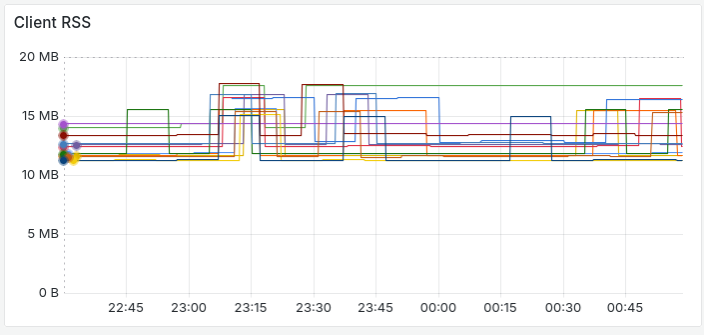
The client and server both send memory telemetry (if it’s enabled), and they’re both very efficient:
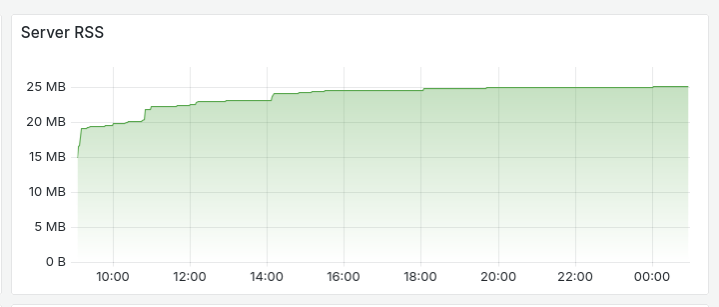
That’s serving a couple of dozen clients. Here are some of them:
All telemetry now uses the OpenTelemetry format, where previously it used InfluxDB.
Client/Server
I’ve already written a fairly detailed description of the way Gurp compiles and sends machine configs in server mode, but briefly, Gurp used to compile config on the server. It now assembles the config on the server, but compiles it on the client. This means you only have to keep config in one place, and your code can safely refer to local facts, or examine the local filesystem.
And…
What else? Gurp now uses a lock file to stop runs piling up. Gurp itself is crazy fast, but if you happen to install something like the texlive package, it might matter.
Error reporting is improved, with lots of thiserror and anyhow::Context
threaded through the codebase.
Gurp can serve up its own binary via the /api/v1/gurp-binary path, which makes
bootstrapping a new host extremely efficient.
There’s also been a lot of refactoring, bug-fixing, and little features that don’t merit a write-up here. It’s a big change.
2.x and 3.0?
I have lots of ideas for the future. If there’s anything you would like to see in Gurp, please do open an issue or submit a PR. There’s even a doc to help you write new doers.
Peace and Gurping. Believe.