As of version 1.3.0 Gurp,
as well as applying locally stored configuration, can assert state fetched from
a central server. There’s no separate server binary, you just fire up
gurp server and point it at the directory storing your config files.
$ uname -n
serv-build
$ gurp server --config-dir=/home/rob/work/my-gurp
2025-11-05T22:38:40.998990Z  INFO commands::server: starting Gurp in server mode
2025-11-05T22:38:41.002976Z  INFO server::http: Listening on 0.0.0.0:1867
2025-11-05T22:38:41.003152Z  INFO server::http: Config dir is /home/rob/work/my-gurp
Then tell your client to apply from a server:
# uname -n
serv-ws
# gurp apply --server=serv-build
2025-11-06T12:41:59.468604Z  INFO doers::host: fetching config from
                             http://serv-build:1867/config/serv-ws?server_name=serv-build
2025-11-06T12:41:59.502863Z  INFO doers::host: Configuring host: serv-ws
2025-11-06T12:42:01.012578Z  INFO commands::apply: Run time: 1.544s
2025-11-06T12:42:01.012607Z  INFO commands::apply: resources: 32  changes: 0
Let’s get the caveats out of the way first.
- The Janet config is compiled on the server. This is a problem if your config references inspects the local host in any way. There are a couple of little tricks to help though, which we’ll talk about later.
- Yes, it’s plain, unauthenticated HTTP. So far as I know, in the whole entire world, Gurp only runs on my internal home-lab network. I don’t need encrypted connections or certificates to prove identities, and I really don’t want to deal with the fuss of implementing it, or even of managing it. I don’t know… run it through Wireguard or something.
Let’s use Gurp to build a Gurp zone. I’ve shown how to create zones lots of
times in the past, so we’ll assume the zone exists. Here’s a Gurp server role.
All we have to do is wrap the gurp binary in an SMF service, and make a
low-privileged user for it to run as.
(user/ensure "gurp"
             :gecos "gurp server user"
             :primary-group "daemon"
             :shell "/bin/false"
             :home-dir "/var/tmp"
             :uid 1867)

(smf/ensure "gurp-server"
            :fmri "sysdef/application/gurp-server"
            :description "config management server"
            :duration "child"
            (smf-method "start"
                        :exec (argcat "/opt/site/bin/gurp"
                                      "server"
                                      "--metrics-to=http://metrics:8428"
                                      "--config-dir=/data/gurp")
                        :timeout 20
                        :user "gurp"
                        :group (this :user :gurp :primary-group)
                        :privileges ["basic" "!proc_session" "!proc_info" "!file_link_any"]))
And let’s check it’s up. (It’s in my DNS.)
$ curl gurp:1867/status
ok
We can bootstrap zones from the server (network config removed for brevity)
(zone/ensure "example-zone"
             :brand "lipkg"
             :clone-from gold-zone
             (zone-bootstrap :server "gurp.lan.id264.net"
                             :hostname "kate-ws"))
And we can set up a cron job to keep the state we defined:
(cron/ensure "run gurp"
             :minute (cron-minutes-from-name (hostname) 10)
             :command (argcat "gurp" "apply" "--server=gurp"))
You might have noticed the server command, like apply, accepts
--metrics-to. It emits OpenTelemetry metrics, which my VictoriaMetrics server
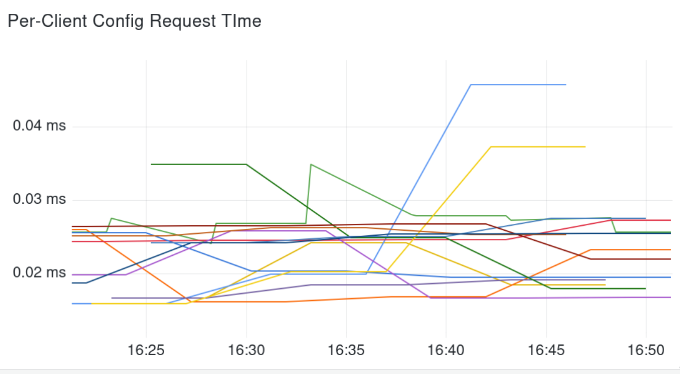
collects. Here’s the time spent compiling and sending config for clients. It’s
not the clearest at this size with no hover legend, but I promise it’s much more
meaningful in real life:
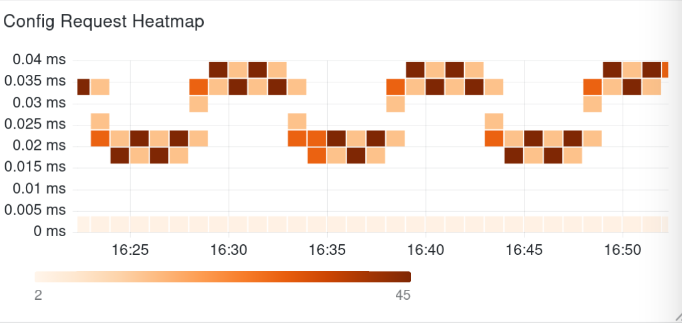
Those times are also bucketed into histograms, so we can get a heatmap of compilation times. No interesting outliers I’m afraid:
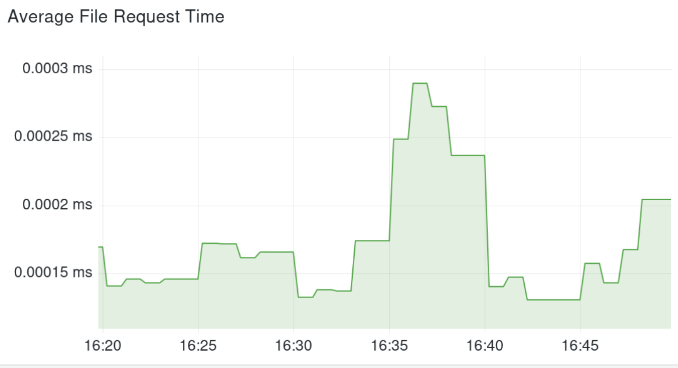
And here’s the average time spent sending plain files back to clients.